
















Adobe’s Project Indigo Gets a Long Exposure Mode That Beats the iPhone’s One-Second Limit
Nov 19, 2026
Dunja Đuđić Kalinin
Dunja Djudjic is a multi-talented artist based in Novi Sad, Serbia. With 15 years of experience as a photographer, she specializes in capturing the beauty of nature, travel, concerts, and fine art. In addition to her photography, Dunja also expresses her creativity through writing, embroidery, and jewelry making.
Share:
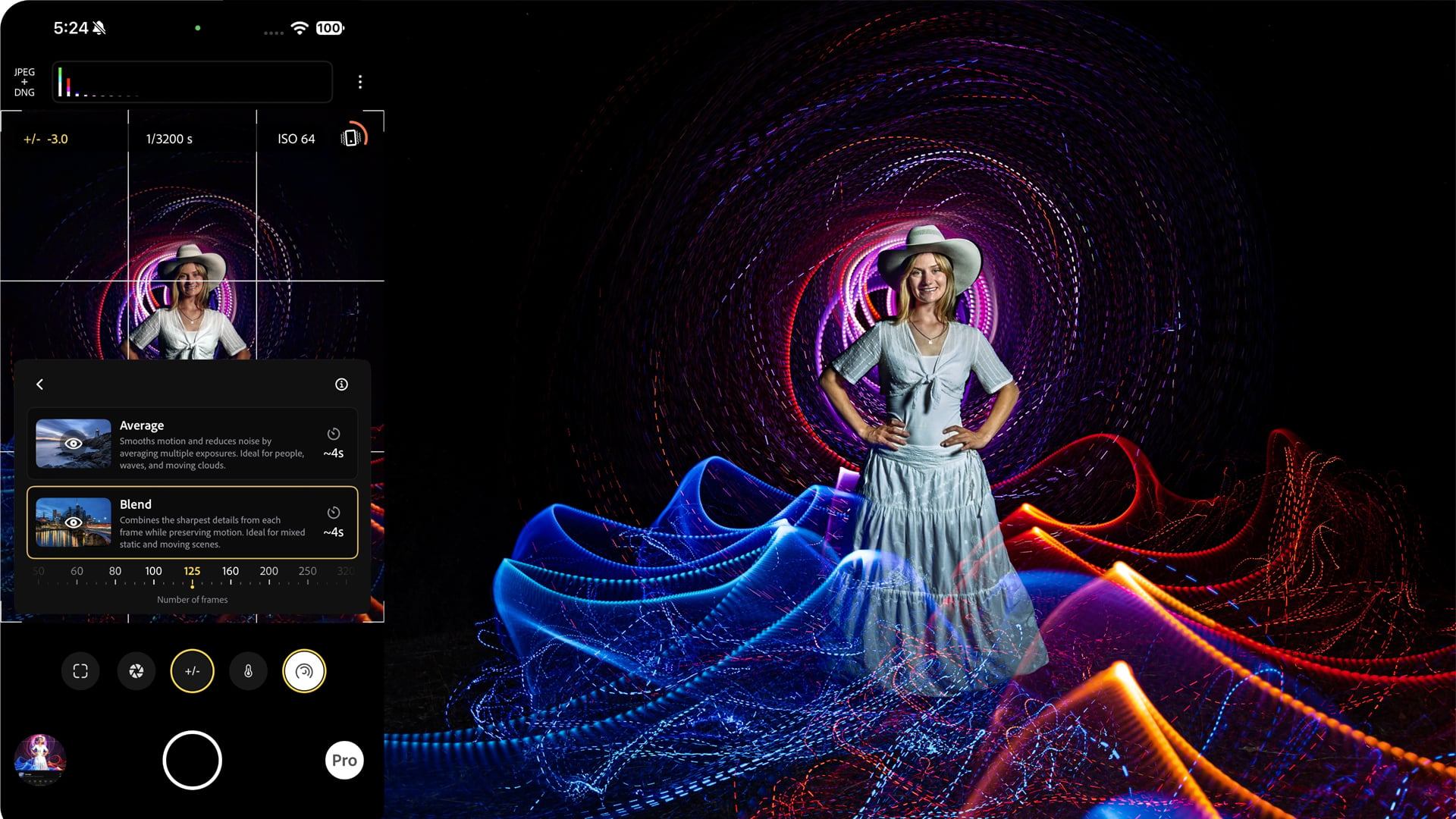
Your iPhone won’t let you keep the shutter open for longer than one second, but Adobe’s Project Indigo camera app has found a way around that. Its latest update adds a dedicated Long Exposure mode that stacks hundreds (or thousands) of short frames into one long virtual exposure. Think silky waterfalls, car light trails, fireworks, or light painting, all possible as long as you bring a tripod.
Adobe’s team walked through the new mode in a recent post on the Project Indigo blog. When the app launched in 2025, long exposure was a basic option tucked inside Night mode. Now it gets its own spot in the mode carousel, labeled Long, next to Photo and Night. The viewfinder also shows a live preview, so you can watch the image build up as it’s being captured.
And before you roll your eyes at yet another Adobe AI thing: nothing here is AI-generated. This is frame stacking, a technique photographers have relied on for ages, just done inside the app.
How It Works
Small phone sensors don’t handle long exposures well, which is why most phones cap the shutter speed at a few seconds (one second on iPhones). Indigo gets around this by capturing a series of shorter frames and merging them into one image.
The difference between Indigo’s Photo and Night modes is that Long Exposure doesn’t align the frames before merging them. That’s what turns moving water and passing cars into a blur, and it’s also why your phone has to stay perfectly still. A tripod is ideal, though Adobe says a rock will do in a pinch. In my experience with long exposures, a nearby curb or your car’s roof work fine as well.
You choose how many frames Indigo captures per shutter press. The more frames you merge, the smoother the result looks. If you want more than 1,000, set it to ∞ and press the shutter again when you’re done.
There are two merging styles to pick from:
- Average takes the per-pixel mean of all the frames. It’s the one for flowing water, fast-moving clouds, or clearing people and cars out of a busy scene.
- Blend mixes the mean with the per-pixel maximum, so bright, fleeting moments stay bright no matter how many frames you merge. Use it for light trails, fireworks, and lightning.
One thing to watch: Indigo captures 30 frames per second at most. If your shutter speed is faster than 1/30 s, you’ll get gaps between frames, and your light trails will look like dotted lines. Lowering the ISO helps, and in brighter conditions, you may need an ND filter. On the iPhone 18 Pro and Pro Max, you can also stop the main camera down to f/2.8 or f/4 through Indigo’s Pro Controls.
What You Can Use It For
Adobe’s examples cover a lot of ground, and they’re a good starting point if you want ideas:
- Water to silk: Average style and around 300 frames is enough to turn waves or a creek into fog.
- Light trails and lightning: Blend style keeps every streak of light. For lightning, set the frames to ∞ and stop the capture once you’ve caught a bolt or two.
- Fireworks: Blend style plus a strong ND filter. Adobe also added an infrared-blocking filter, since the iPhone sensor picks up a bit of IR and fireworks can come out with a brick-red cast.
- Steel wool spinning and light painting: these call for Pro Controls (manual focus, ISO, shutter speed), and two of the examples were shot by light painting photographer Susan Magnano. The blog includes a full safety rundown for the steel wool part, and you should read it before you set anything on fire.
- Freezing motion: somewhat counterintuitively, a strobe flash in a dark room, or a very fast shutter with bright lights, gives you frozen splashes and multiple-exposure effects.
How to Get It
Project Indigo is free on the App Store, so all you need to do is update the app. You can also open Indigo from Lightroom Mobile if you’ve enabled it under App Settings > Early Access > Tech Preview.
Adobe admits the mode is less automatic than what most phone photographers are used to, and it’s not meant for quick snapshots. The team is already floating ideas for what comes next, including tripod-free water-to-silk shots, exposure bracketing, and astrophotography in moonless skies. Until then, this sounds like a fun excuse to dig that phone tripod out of the drawer and see what you can do with this app. I sadly don’t use an iPhone to be able to test it out, but if you have any impressions, do share them in the comments!
[Image courtesy of Adobe]
See more from DIYPhotography.net on Google
Add DIYPhotography.net as a trusted source. This makes
our stories more likely to appear in your Google Search results.
 Add as a preferred source on Google

Dunja Đuđić Kalinin
Dunja Djudjic is a multi-talented artist based in Novi Sad, Serbia. With 15 years of experience as a photographer, she specializes in capturing the beauty of nature, travel, concerts, and fine art. In addition to her photography, Dunja also expresses her creativity through writing, embroidery, and jewelry making.




Join the Discussion
DIYP Comment Policy
Be nice, be on-topic, no personal information or flames.