












What is shutter speed in photography? How It Affects Exposure and Motion Blur
Jul 8, 2026
Alex Baker
Alex Baker is a portrait and lifestyle driven photographer based in Valencia, Spain. She works on a range of projects from commercial to fine art and has had work featured in publications such as The Daily Mail, Conde Nast Traveller and El Mundo, and has exhibited work across Europe
Share:

Shutter speed is one of the most important camera settings every photographer should understand. It controls how long your camera’s shutter stays open, determining how much light reaches the camera sensor and how motion appears in your photos.
Along with aperture and ISO, shutter speed forms part of the exposure triangle. Learning how shutter speed works will help you capture sharp action shots, create intentional motion blur, and achieve the correct exposure in a wide range of lighting conditions. In this guide, we’ll explain what shutter speed is, how it’s measured, how it affects exposure and motion blur, and how to choose the best shutter speed for different types of photography.
[Learn Photography: Aperture | Shutter Speed | ISO | Exposure Triangle | White Balance | Depth of Field | Panning | Vinneting | TTL | More…]
Table of contents
- What Is Shutter Speed in Photography?
- How Is Shutter Speed Measured?
- What is bulb mode?
- How does shutter speed affect exposure in photography?
- How Shutter Speed Affects Motion Blur
- What shutter speed is best for shooting handheld?
- Is a high shutter speed always better?
- What Is the Best Shutter Speed?
- FAQs
- Conclusion
What Is Shutter Speed in Photography?
Shutter speed is the amount of time your camera’s shutter remains open, allowing light to reach the camera sensor (or film in analogue cameras). Also known as exposure time, shutter speed is measured in seconds or fractions of a second and plays a key role in determining both exposure and how motion appears in a photograph.
When you press the shutter button, the shutter opens for the selected length of time before closing again. Longer shutter speeds let in more light, while faster shutter speeds reduce the amount of light reaching the sensor.
If you increase your shutter speed, the shutter will be open for a shorter time, allowing less light into the camera. Inversely, a longer shutter speed will increase the exposure time, and allow more light into the camera and will keep the shutter open for longer. A slower shutter speed can capture the motion of a moving subject, while a faster shutter speed freezes the motion, producing a (potentially) sharper image.
How Is Shutter Speed Measured?
Shutter speed is measured in seconds or fractions of a second and is usually displayed as values such as 1/1000, 1/250, 1/30 or 1 second. If you see 1/50, for example, that means that the shutter is open for one fiftieth of a second. 1/4 is one-quarter of a second. Once you get to whole seconds, you will see whole numbers such as ‘1’, 4, or 15, for example.
What is bulb mode?
Bulb mode (B) is a manual long-exposure setting that lets you keep the shutter open for as long as you hold the shutter button (or remote release). Most cameras will do a timed shutter speed of up to 30 seconds in length. By using blub mode (B), you can keep the shutter open manually for as long as you want.
This is a useful tool for light painting, creating star trails, or shotting in extreme low light conditions. It’s helpful to time it via an external stopwatch for accurate results. And you will need to use a tripod. It can be useful for shooting extremely long exposures of several minutes, such as for capturing star trails.
How does shutter speed affect exposure in photography?
Alongside aperture and ISO, shutter speed is directly involved in creating the exposure of your image. A simple shutter speed adjustment can alter how dark or light your photograph appears. This can be useful if you want to make minor adjustments to the exposure without changing your aperture.
Because light is measured in stops, the numbers you’ll see on your camera when you change the shutter speed refer directly to the length of time the shutter is open. For example, a shutter speed of 1/100 means that the shutter will be open for one-hundredth of a second. A shutter speed of 1/8 means that the shutter is open for one-eighth of a second.

Generally, most DSLRs and mirrorless cameras will let you adjust the shutter speed in third stops. It’s very useful to learn and memorize stops of light, particularly when shooting in manual mode, so that you can make accurate and fast adjustments.
How Shutter Speed Affects Motion Blur
One of the most interesting aspects of shutter speed is its effect on motion and its appearance in an image. A very fast exposure time can be used to freeze motion in an image. This can be effective when shooting fast-action sports, children, pets, or freezing water splashes in mid-air.

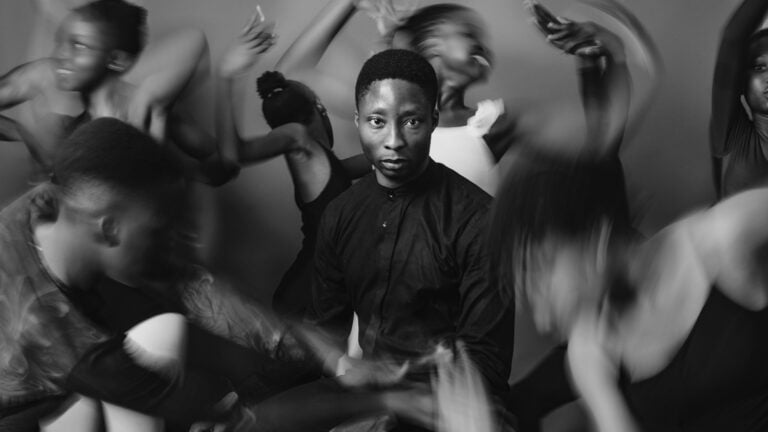
The opposite is true if you choose a slow shutter speed. By ‘dragging the shutter‘ as it’s sometimes called, you can create light trails at night, smooth out water in landscapes, or create creative ‘ghost-like effects when photographing people. Similarly, you can combine a slow shutter with deliberate camera movement to create artistic effects such as zoom bursts and pan blurs.

What Shutter Speed Prevents Motion Blur?
Unfortunately, choosing too slow of a shutter speed can result in unwanted motion blur. Either the camera wasn’t steady enough, resulting in a camera shake, or the subject was moving too quickly. This can result in an image that appears out of focus. Most of us have the odd shot, usually of children or animals, where they just moved too quickly for your exposure time; it happens!
To avoid motion blur when photographing people, try to stick with a shutter speed of 1/160 or higher if they are moving rapidly.

What shutter speed is best for shooting handheld?
It’s a great idea to understand how slowly you can effectively handhold your camera to avoid camera shake. It does depend on the focal length of your lens as well. A shorter focal length lens will always be easier to handhold for longer than a telephoto lens, which magnifies any motion.
A useful rule of thumb is to use a shutter speed at least twice the reciprocal of your focal length. For example, when using a 200mm lens, aim for around 1/400 sec or faster when shooting handheld.
I know that I can reliably shoot a 50mm lens at 1/100 for a stationary subject with no evidence of camera shake. I could, at a push, go down to 1/80, but I would prefer not to. Generally, I have shaky fast hands from years of playing musical instruments. My father, on the other hand, is on heart medication and can hand hold down to 1/30 with no issues. It’s a very personal thing.
Nowadays, with IBIS and IS on the lens, it’s possible to shoot at much slower shutter speeds and still avoid any camera shake. Keep in mind that image stabilisation only reduces camera shake. It won’t freeze a moving subject, so you may still need a fast shutter speed when photographing people, wildlife or sports.
Is a high shutter speed always better?
Selecting a higher shutter speed isn’t always the best solution. As always, it depends on your subject. If your subject is stationary, you can place your camera on a tripod and shoot for longer exposure times and lower ISO for a less noisy image.
Using a very fast shutter speed demands a lot of available light. This may not always be possible, particularly if you want to shoot with lower ISOs and smaller apertures for greater depth of field.
What Is the Best Shutter Speed?
There is no one ‘best’ shutter speed to use. It is always dependent on the light, the subject, and what effect you’re trying to create. There are no hard and fast rules. However, in some situations you might want to use a fast, medium, or slower exposure time for optimum results. Still, it’s always best to experiment.
Fast shutter speed for freezing motion
If you’re shooting fast-moving subjects such as kids or pets and want to freeze the action, then a shutter speed of around 1/160 should suffice on a regular lens such as a 50mm.

Similarly, if you want to freeze the motion of water, then you will need to choose a fairly fast shutter speed, say around 1/250 or more. If the water is really raging or you want to freeze individual droplets, then you will have to go with a shorter exposure time. If it’s a bright sunny day, then that shouldn’t be a problem.
To freeze the motion of vehicles such as cars or motorcycles again, you will need to go with a fast shutter speed. A minimum of 1/500, but most likely, if your subject is race cars, then you’ll have to go much higher, 1/1000 to 1/8000, for example.

The direction of motion makes a difference as well. You can use the panning technique to shoot a very fast-moving subject, which will blur the background slightly but help freeze the motion of your subject.
Slow shutter speeds for creative effects
One of the most fun elements of shutter speed is slowing it down to create interesting effects. You can blur the motion of water, create smooth effects, create light trails, or even make your own light paintings.
For waterfalls and smooth water
When selecting a slow shutter speed, there is always a lot of experimentation involved, so don’t be afraid to try changing the length of your exposure to see what happens. An ND (neutral density) filter is often essential during daylight, allowing you to use slower shutter speeds without overexposing the image.
To shoot waterfalls and other bodies of water, select the lowest ISO possible and choose a small aperture. Be careful not to over-expose the highlights. To create smooth water effects, you could start with a fairly slow shutter speed of 1/8 or 1/4 and see what that looks like.
From there, you can reduce the shutter speed further to several seconds if you want the motion to be completely smooth. Be careful not to over-expose the highlights. Of course, you will also need to use a tripod and either a remote shutter release or use the 2-second timer delay.


Deliberate camera movement
You can create some lovely abstract photo effects by shooting handheld and moving the camera in particular ways combined with a slow shutter speed. Again much of this takes trial and error, but it can be a lot of fun. Try pairing a shutter speed of around 1/4 with a panning motion, an up-and-down motion, or even a twist. See what you come out with; it’s always quite a surprise.


Shutter speed and flash photography
If we are talking about shutter speed, then it’s worth mentioning its role when using flash. When using flash, shutter speed controls the ambient light in the scene but has very little effect on the brightness of the flash itself. Flash exposure is primarily controlled by flash power, aperture and ISO.
You will need to know your camera’s flash sync speed and make sure that you choose a shutter speed below that. It’s usually either 1/200 or 1/250. However, it’s worth checking because I do have a camera with a sync speed of 1/160.

You want to stay within this limit to avoid the shutter showing up in the image and producing a black ‘curtain’ across a portion of the photograph. If you absolutely must shoot at a higher shutter speed to freeze fast-moving objects, for example, then you can use the high-speed sync option on your strobe.
The importance of shutter speed in astrophotography
Shutter speed also has an important effect on photographing the night sky and astrophotography. Generally, you will want to shoot with long exposures of around 15 to 25 seconds. However, longer than that and you could start to capture light trails in the stars. If this is something you actually want, then shoot with very long exposure times in bulb mode. Here you manually keep the shutter open. Star trails can create beautiful effects. Otherwise, you will need to use a star tracker device that rotates at the same speed to prevent movement in the image.
Many astrophotographers use the 500 Rule as a starting point for calculating the longest shutter speed before stars begin to trail, although higher-resolution cameras often benefit from even shorter exposures.

FAQs
How to change the shutter speed on your camera
In most modern cameras, you can see the shutter speed on the LCD or in the viewfinder. To take advantage of the creative power of choosing your shutter speed, use either shutter priority mode or manual mode. In both of those modes, you can turn a dial to change the shutter speed. The location of the dial may change from camera to camera, but it is usually near the thumb or forefinger.
What is shutter priority mode
Shutter priority mode (also called Time Value mode) is labeled as Tv (Canon) or S (Nikon) on your camera. This is a great mode to start with, especially if you’re just starting out. In this mode, you set the shutter speed, and your camera will select the aperture and the most appropriate ISO depending on the conditions.
How to control shutter speed in manual mode?
In manual mode, which is usually labeled M, you control the shutter speed in a similar way, but you will also need to change the aperture and ISO accordingly to get a correct exposure. This gives you the most control over your blur, exposure and depth of field
Conclusion
Shutter speed is one of the most powerful creative controls on your camera. Whether you want to freeze fast-moving action, capture silky-smooth waterfalls or photograph handheld in low light, understanding shutter speed gives you far greater control over your images.
A great way to learn is by switching to Shutter Priority mode and experimenting with different settings. After just a few shots, you’ll quickly see how changing the shutter speed affects both exposure and motion, making it much easier to choose the right setting for any scene.
See more from DIYPhotography.net on Google
Add DIYPhotography.net as a trusted source. This makes
our stories more likely to appear in your Google Search results.
 Add as a preferred source on Google
Alex Baker
Alex Baker is a portrait and lifestyle driven photographer based in Valencia, Spain. She works on a range of projects from commercial to fine art and has had work featured in publications such as The Daily Mail, Conde Nast Traveller and El Mundo, and has exhibited work across Europe


Join the Discussion
DIYP Comment Policy
Be nice, be on-topic, no personal information or flames.